 stefanwalther

Validate, package and deploy your Qlik Sense Visualization Extension projects with ease.





Table of Contents
Motivation
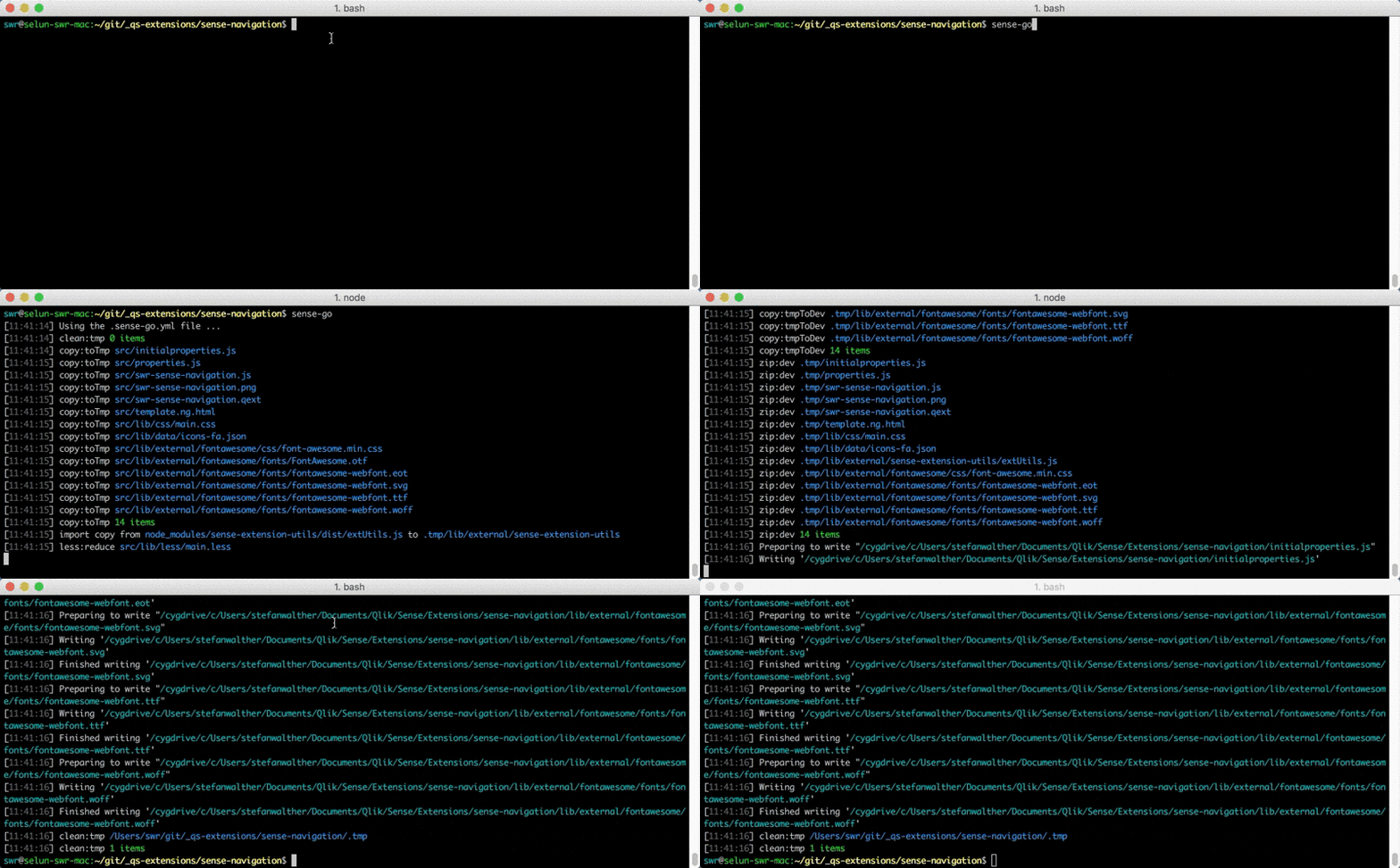
sense-go automates typical repetitive tasks when developing a Visualization extension for Qlik Sense, such as:
- Preparation tasks
- Import dependencies (like libraries, images, fonts, etc.)
- Packaging
- Health checks for your source files
- Compile your .less files to CSS
- Deployment
- to GitHub or your favorite VCS
- to Qlik Sense Desktop
- to a Qlik Sense Server
- to a .zip file to share with others
- Watching your changes
- to just rebuild everything automatically
Technically speaking sense-go is just a collection of configurable gulp tasks which can be easily re-used and extended.
Installation
Package installation
Install sense-go as a global node.js package
$ npm install -g sense-goor use it as a Docker image.
Usage
There are basically three different approaches to use sense-go.
1) CLI with default configuration
Just run sense-go in the command line in the root folder of your project (and follow the conventions).
The default configuration will be considered.
2) CLI with custom configuration
Place a .sense-go.yml file in the root folder of your project, then run sense-go in the CLI.
The easiest way to start with your custom configuration is to copy the default configuration file and start modifying it. But keep in mind, following the conventions , you should only need to adapt a few of the default configurations.
3) Programmatic usage
If you want to add custom gulp tasks, this is the way to go.
- Create a file
sense-go.jsin the root of your project based on the following skeleton:
'use strict';
var senseGo = require( 'sense-go' );
var gulp = senseGo.gulp; // Get the reference to the gulp instance used in sense-go

senseGo.init( function () {

    // Now all default tasks are loaded, can be modified or new ones can be added

    // Run your tasks, e.g. with
    gulp.series(['build']);

});
Note: sense-go is using the beta of Gulp 4
Conventions
The entire concept follows conventions (or best practices) being used when setting up a project:
| PROJECT-ROOT
|-- build         <= all builds, including source code or zipped files
    |-- dev       <= target for the development build
    |-- release   <= target for the release build
|-- docs          <= documentation files, then used by verb
|-- src           <= all source files
    |-- lib
    |-- css       <= see below *
        |-- less  <= less files
| .sense-go.yml   <= sense-go configuration file (OPTIONAL)
| .verb.md        <= verbs readme template
| package.json
* If using less files is preferred for a project, I keep this folder empty, otherwise all the .css files will be place here
sense-go works best if you follow these conventions, but everything is configurable, it's just a bit more work to get sense-go running.
Basic workflow
The workflow of the pre-configured tasks can be summarized as follows:
- You develop in the
.srcfolder - Whenever you want to test or deploy, use a one-liner in your command line:
sense-go- This will
- Convert
.lessfiles to.cssfiles - Lint, Minify, Ugilify the output
- Create a .zip file to distribute your visualization extension
- ... a lot of other neat tasks ... fully customizable ...
- Convert
- This will
- Then the extension is automatically being deployed
- To the local extension directory (Qlik Sense Desktop)
- Imported to the Qlik Sense Server (using the Qlik Sense Repository API)
- to other destinations, like via SSH
- You can test the extension
It is important to mention that you can by 100% re-define the workflow and also all default settings, but the idea of sense-go is really to get something up and running across different projects with as little configuration and development work as possible. So choose custom configurations wisely.
Behind the scenes
Behind the scenes the following happens:
- All relevant content of the src folder is copied to a temporary folder .tmp
- Then in the .tmp folder some transformation of existing files happens
- As soon as this is done, files are copied to a .build folder ( .build/dev in case of the dev strategy, .build/release in case of the release strategy)
- Then the enabled deployment tasks start
- Copy all files to the local Qlik Sense Desktop
- Deployment to any server using the QRS API
- Deployment to any other server using SSH
- (All temporary folders (like .tmp) are deleted)
API / Programmatic Usage
Pass in a custom configuration as object
In your sense-go.js pass in a custom configuration object to senseGo.init as follows:
'use strict';
const SenseGo = require('./lib/');
const senseGo = new SenseGo();

var customConfig = {
  deployment: {
    toLocal: {
      enabled: true
    }
  }
}

// customConfig will be used to overwrite existing settings from the default-settings.
// Any setting not being defined in your custom configuration will be taken from the default settings.
senseGo.init( customConfig, function () {


});
Load configuration from a file:
'use strict';
const SenseGo = require('./lib/');
const senseGo = new SenseGo();

var customConfig = senseGo.loadYml( path.join(__dirname, 'custom-config.yml'));

senseGo.init( customConfig, function () {


});
Add custom tasks
'use strict';
const SenseGo = require('./lib/');
const senseGo = new SenseGo();
const gulp = senseGo.gulp; // Get the reference to the gulp instance used in sense-go

senseGo.init( function () {

    // Create a new custom task
    gulp.task('custom', function( done ) {
        console.log('Custom Task');
        done();
    });

    // Create a custom task chain, re-using 'build'
    gulp.task('customBuild', gulp.series(['custom', 'build']));

    // Run it ...
    gulp.series('customBuild')();

});
Tasks
There are three categories of tasks:
- Building: Build the solution (either for debugging or release) before you deploy.
- Deployment: Deploy the solution to different targets.
- Publishing & Tools: Some helpers to publish the solution.
Building
Clean
Cleaning and deleting folders.
clean:tmp
- Delete the entire
.tmpdirectory. - Options used:
tmpDir
clean:buildDev
- Deletes all files in the
./build/devdirectory. - Options used:
buildDevDir
clean:buildRelease
- Deletes all files in the
./build/releasedirectory. - Options used:
buildReleaseDir
clean:localExtensionDir
- Deletes all files in the project's local extension folder. Only makes sense if using deployment to a local Qlik Sense Desktop.
- Disabled if
deployment.toLocal.enabled === false. - Options used:
deployment.toLocal.enabled
clean:tmpIllegal
- Clean all files in the
.tmpdirectory which are not supposed to be deployed to the extension directory. - These are all files, except files with the following file extension:
{png,jpg,jpeg,json,qext,txt,js,css,eot,svg,ttf,woff,html,htm,wbl,svg}
Copy
Copy files to a specific directory.
copy:toTmp
- Copies all files (except the excluded ones) from the
srcfolder to the.tmpfolder. - Options used:
srcDirtmpDir
- Excluded files:
*.less
copy:tmpToDev
- Copies all files (except the excluded ones) from the
.tmpfolder to.\build\devfolder. - Options used:
tmpDirbuildDevDir
- Excluded files:
*.less
copy:tmpToRelease
- Copies all files (except the excluded ones) from the
.tmpfolder to.\build\releasefolder. - Options used:
tmpDirbuildReleaseDir
- Excluded files:
*.less
Import
Import files to the deployment.
import:fromLocal
The main use-case behind the import:fromLocal task is to be able to import "external" files from external dependencies (e.g. node_modules or bower) into the .tmp directory to use them in the solution.
Define the file you want to import in your .sense-go.yml file as follows:
Example:
import:
  fromLocal:
    enabled: true
    files:
      - ["./node_modules/d3/d3.min.js", "./.tmp/lib/external/d3/d3.min.js"]
      - ["./node_modules/moment/min/moment.min.js", "./.tmp/lib/external/moment/moment.min.js"]
import:fromSsh
Import one or more files from a remote sever (with SSH enabled) to your local projects.
Define the sources and targets in your .sense-go.yml or .sense-go.local.yml file as follows:
Example (Import just one file):
import:
  fromSsh:
    enabled: true
    host: "192.168.10.20"
    port: 22
    user: "<username>"
    pwd: "password"
    src: "/remote/path/to/your/file"
    dest: "./tmp/whatever"
Example (Import a collection of files):
import:
  fromSsh:
    enabled: true
    host: "192.168.10.20"
    port: 22
    user: "<username>"
    pwd: "password"
    files:
      - src: "/remote/path/to/your/file"
        dest: "./tmp/whatever"
      - src: "/remote/path/to/your/2nd/file"
        dest: "./tmp/whatever"
Replace
Replaces string patterns in text files across the project.
replace:tmp
- Use `@@ to prefix the key to be replaced with a given value in the source code
- Replacements will only be performed in the following file types:
- .html
- .js
- .json
- .qext
- .txt
- .xml
- .yml
Using data from package.json
All keys from your package.json file are available out of the box if you use the prefix pkg
- To get the version, use
@@pkg.version - To the get name, use
@@pkg.name - etc.
Example:
console.log('Extension @@pkg.name, version @@pkg.version');with the following package.json
{
  "name": "my-extension",
  "version": "0.1.12"
}
will return
Extension my-extension, version 0.1.12Builtin patterns The following patterns are available out of the box:
@@timestamp- Defaults to new Date().getTime()
Adding replacement patterns Add new replacements patterns in your .sense-go.yml file:
replacements:
  custom:
    test1: bla bla
  custom2:
    var1: true
    var2: "Whatever comes here"
Then in your e.g. JavaScript file use the replacements:
console.log('custom.test1', '@@custom.test1');
console.log('custom2.var2', '@@custom2.var1');
console.log('custom2.var2', '@@custom2.var2');
Will return:
bla bla
true
Whatever comes here
Less
Converts .less files to .css files.
All less tasks automatically autoprefix (using gulp-autoprefixer)
less:reduce
- Uses
/src/less/main.less, resolves all its dependencies and creates/.tmp/css/main.css - Options used:
lessReduce.srclessReduce.dest
less:each
- Converts every
.lessfile from the source directory to a corresponding .css file in the .tmp directory. - Options used:
lessEach.srclessEach.dest
Uglify
Uglify & minifies JavaScript files
General uglify options
uglify*- All options directly passed togulp-uglify, e.g.uglify.mangleuglify.beautifyuglify.compressuglify.preserveComments- (Default: 'license')
Further options can be passed according to the gulp-uglify documentation.
uglify:tmp
- Uglify all JavaScript files.
- Options:
uglifyTmp.src- Included source files. (Default: `./.tmp/**/.js`)*uglifyTmp.srcExcluded- Excluded source files (Default: `./.tmp/**/.min.js`)*
Minification/Optimization
Several minification tasks
htmlmin:tmp
- Minifies all htm/html files in the
tmpfolder. - Options used:
tmpDir
minify:json:tmp
- Minify .json & .qext files.
- Options used:
tmpDir
Wbfolder
Create a wbfolder.wbl file to be used in Dev Hub - Extension Editor.
wbfolder:tmp
- Creates a wbfolder.wbl file in the
.tmpdirectory. - Options used:
wbfolder.enabled- Whether the task is enabled or not, defaults totrue.wbfolder.cwd- Working directory, defaults to./.tmp.wbfolder.src- Source mask, defaults to./**/*.*.wbfolder.dest- wbfolder.wbl file destination, defaults to./.tmp/wbfolder.wbl.
Note: The wbfolder.wbl file is only necessary if you want to allow users to open your visualization extension in Qlik Dev Hub.
wbfolder.wbl is NOT required and necessary to run your visualization extension in Qlik Sense.
Zip
Create .zip files based on the building strategy
zip:dev
- Creates a zip file following the pattern "%packageName%_dev.zip" (e.g. "my-extension_dev.zip")
- This task is used in the pre-built task-chain build and will create the output of the build-strategy "dev"
- Options used:
tmpDirbuildDirpackageName
zip:release
- Creates a zip file following the pattern "%packageName%_v%pkg.version%.zip" (e.g. "my-extension_v0.12.1.zip")
- This task is used in the pre-built task-chain release and creates a packaged version of your current version
- Options used:
tmpDirbuildDirpackageNamepkg.version
zip:latest
- Create a zip file following the pattern "%packageName%_latest.zip" (e.g. "my-extension_latest.zip")
- Useful to have a provide a link to the always latest version
- Options used:
tmpDirbuildDirpackageName
Deployment
Publishing & Tools
Bump
Bumps the version in your package.json file
bump:patch
- Changes the version in package.json from
0.2.1to0.2.2 - Shortcuts:
sense-go borsense-go b:p
bump:minor
- Changes the version in package.json from
0.2.1to0.3.1 - Shortcut:
sense-go b:min
bump:major
- Changes the version in package.json from
0.2.1to1.0.0 - Shortcut:
sense-go b:maj
bump:version
- Set the package.json version to a specific value given by the parameter
--newversionresp.--nv. - Shortcut:
sense-go b:v
Example:
$ sense-go bump:version --newversion=0.1.0
$ sense-go b:v --nv=0.1.0
Possible command line parameters
--tag
- Tags the current version of your commit with the newly created version created by any of the bump-tasks.
--commit="Your commit message"
- Commits all files with the given commit message, if no commit message is defined, "." will be committed as a message.
Task Chains
Based on gulp tasks provided by sense-go you can then create your task chains. Some are already predefined:
sense-go build
Task build as an example:
  gulp.task(
    'build',
    gulp.series(
      'init',
      'clean:tmp',
      'copy:toTmp',
      'replace:tmp',
      'clean:buildDev',
      'copy:tmpToDev',
      'clean:localExtensionDir',
      'deploy:tmpToLocal'
      )
  );
The default task-chains are defined in the taskChains section in the default-config.yml file.
Modify existing task-chains (by configuration)
You can add additional task-chains or overwrite the existing ones in your project configuration file, e.g:
taskChains:
  ## Completely overwrite the existing "build" task
  "build":
    - "clean:tmp"
    - "copy:toTmp"
    - "copy:tmpToDev"
    - "deploy:toSsh"
Create/Modify task-chains (by code)
You can add additional tasks on top of sense-go, mixing your very own tasks with sense-go tasks, etc.
- Always initialize a task chain with the
inittask - When creating your own tasks, note that sense-go relies on Gulp4
Example:
Use your own gulpfile.js (be aware that sense-go uses gulp 4.0 beta):
'use strict';
var senseGo = require( 'sense-go' );
var gulp = senseGo.gulp;
var path = require( 'path' );

var customConfig = senseGo.loadYml( path.join( __dirname, 'custom-config.yml') );

senseGo.init( customConfig,  function (  ) {

  gulp.task('myTask', function() {
    ...
  } );


  // Create your own task chain, and overwrite the current task chain 'build'
  gulp.task( 'build', gulp.series(
    'init',
    'clean:tmp',
    'copy:toTmp',
    'myTask'        // <== Load your own custom task and mix it with existing ones
  ) );

  // Run your task
  gulp.series(['build'])();

});
Then run sense-go build in the CLI.
Used Gulp plugins
sense-go is heavily relying on existing gulp plugins. A big thank you to the authors of these plugins!!
General
- gulp-babel: Use next generation JavaScript, today | homepage
- gulp-concat: Concatenates files | homepage
- gulp-csslint: CSSLint plugin for gulp | homepage
- gulp-debug: Debug Vinyl file streams to see what files are run through your Gulp pipeline | homepage
- gulp-less: Less for Gulp | homepage
- gulp-load-plugins: Automatically load any gulp plugins in your package.json | homepage
- gulp-replace: A string replace plugin for gulp | homepage
- gulp-rimraf: rimraf plugin for gulp | homepage
- gulp-simple-task-loader: A simple task loader for gulp | homepage
- gulp-watch: Watch, that actually is an endless stream | homepage
Validation
- gulp-csslint: CSSLint plugin for gulp | homepage
- gulp-htmllint: Check HTML code style with htmllint | homepage
- gulp-jsonlint: A jsonlint plugin for Gulp | homepage
Packaging
- gulp-htmlmin: gulp plugin to minify HTML. | homepage
- gulp-uglify: Minify files with UglifyJS. | homepage
- gulp-zip: ZIP compress files | homepage
Transpilation
babel: Turn ES6 code into readable vanilla ES5 with source maps | homepage
About
Author
Stefan Walther
Contributing
Pull requests and stars are always welcome. For bugs and feature requests, please create an issue. The process for contributing is outlined below:
- Create a fork of the project
- Work on whatever bug or feature you wish
- Create a pull request (PR)
I cannot guarantee that I will merge all PRs but I will evaluate them all.
License
Copyright © 2019, Stefan Walther.
MIT
This file was generated by verb-generate-readme, v0.6.0, on January 25, 2019.